Generative AI still waits for your prompt. Agentic AI plans the query, runs it, fixes its own mistakes, and reports back, and that difference is reshaping what a data analyst’s day actually looks like.
Key Takeaway: Agentic AI is not a smarter version of generative AI; it’s a different layer of the stack that uses generative AI as one of its own tools. The real question for an analyst isn’t which one is “better,” but which parts of your workflow you’re still running manually that don’t need to be.
A mid-size D2C brand notices its churn rate jumped 18 percent in a single month, and nobody can say why yet. Someone has to pull the subscription logs, segment the affected cohort, check it against the last pricing change, and turn the whole thing into a one-page summary before the Monday leadership call. That used to be a two-day job split across SQL, Excel, and a slide deck, with most of the time spent waiting on query results and fixing broken joins. In this guide, we will break down what actually separates generative AI from agentic AI inside a data analysis workflow, where each one earns its place, and how a churn investigation like this one plays out differently depending on which type of AI is running it.
Most conversations about AI for analysts still assume a single tool: you type a question, a model answers, and you copy the output into your notebook. That is generative AI, and it is genuinely useful, but it is only half of what is now available to a working analyst. Agentic AI is a separate category, built to take a goal, plan the steps to reach it, call tools on its own, and keep working until the goal is actually met, not just until the prompt is answered. Confusing the two leads teams to either underuse AI, treating it as a glorified autocomplete, or to hand an agent too much access too early.
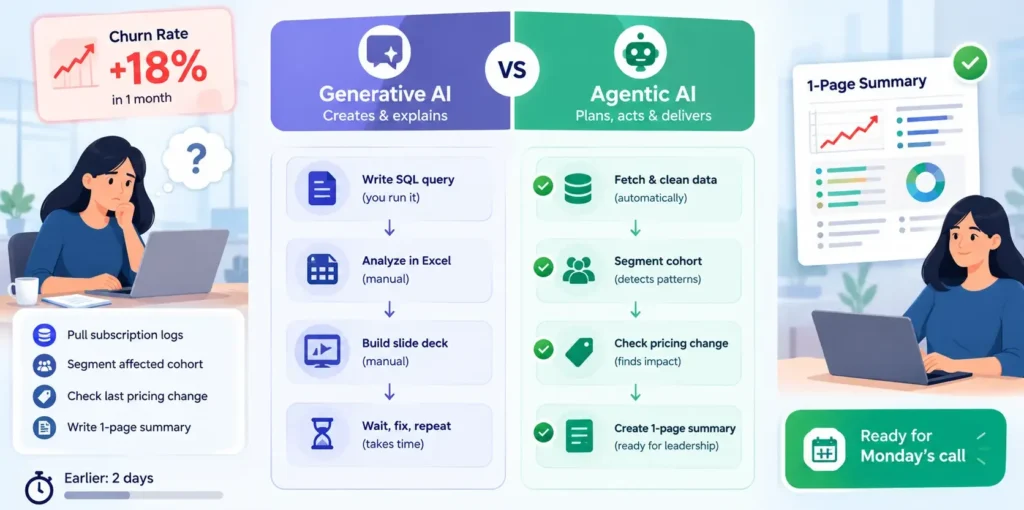
The distinction matters because the two sit in completely different places in an analyst’s day-to-day workflow, and they carry different levels of risk.
| Tool | Primary Role | When an Analyst Uses It |
| Generative AI | Drafts SQL, Python, or R code and turns messy outputs into plain-English summaries | When you already know the task and want a fast first draft to review and run yourself |
| Agentic AI | Plans a multi-step investigation, executes it against live systems, and self-corrects | When the task spans several steps query, test, debug, chart and you’d rather set the goal than run each step by hand |
What Generative AI Actually Does for an Analyst
Think of generative AI as a fast, well-read junior who never touches your actual database. It drafts; you review and run.
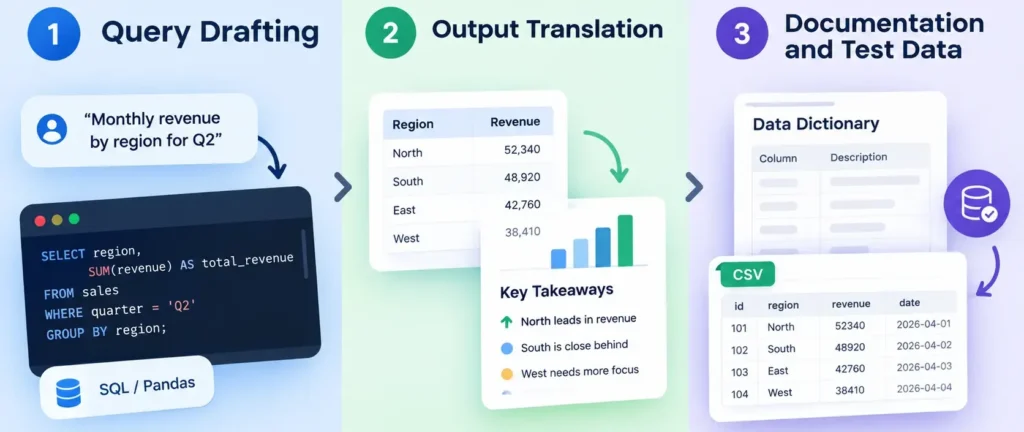
- Query Drafting: Turns a plain-English request like “monthly revenue by region for Q2” into a working SQL or Pandas query, saving the time spent recalling exact syntax.
- Output Translation: Takes a dense statistical table or a correlation matrix and rewrites it as a short paragraph a non-technical stakeholder can actually act on.
- Documentation and Test Data: Generates data dictionaries, column descriptions, or synthetic datasets so a pipeline can be tested before real production data is connected.
The limitation here is structural, not a bug to be patched. Generative AI stops the moment it renders an output. It does not connect to your warehouse, does not catch its own syntax error, and will not know a query failed unless you paste the error message back into the chat yourself. Every step still needs a human to prompt, evaluate, and execute.
Where Agentic AI Takes Over: Planning, Execution, Self-Correction
Agentic AI is built to close that exact gap. Instead of a single prompt-and-response pair, it breaks a goal into a plan, runs that plan against real systems, and adjusts the moment a step fails.
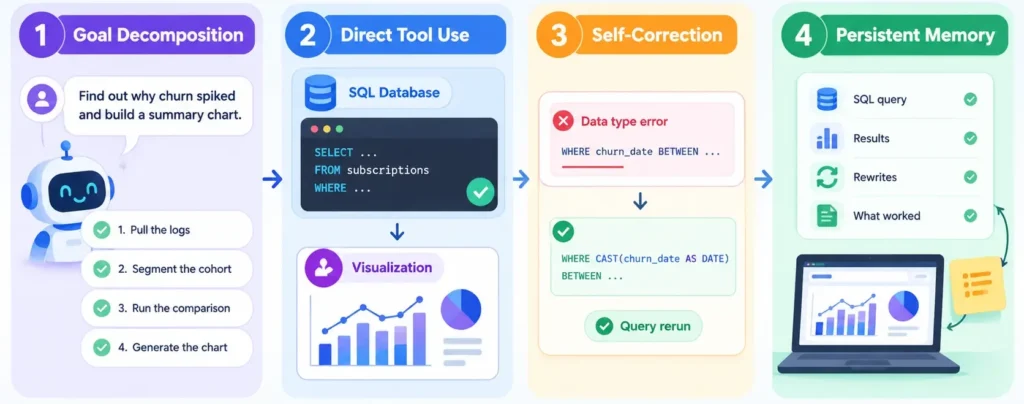
- Goal Decomposition: A broad instruction like “find out why churn spiked and build a summary chart” gets split into a working sequence on its own: pull the logs, segment the cohort, run the comparison, generate the chart.
- Direct Tool Use: It queries the SQL database and calls the visualization library itself, rather than handing you code that still needs to be copied and run manually.
- Self-Correction: If a query throws a data-type error, it rewrites the query and reruns it, without waiting for a human to paste the error back in.
- Persistent Memory: It tracks what it already tried and what the intermediate results were, across the full length of the task, instead of starting fresh with every message.
This autonomy comes with real operational risk. An agent that can write and execute against a live database can also misread the business logic behind a table, join on the wrong key, or run an expensive query at the wrong time of day. That is why agentic setups need guardrails: scoped access controls and a human-approval checkpoint at key steps, rather than full autonomy by default.
Case Study: Investigating the Churn Spike
Go back to the churn problem from the introduction. “Can you tell me why churn jumped 18 percent last month, and get me a chart by Monday?” is the kind of request that plays out very differently depending on which kind of AI is handling it.
The generative AI path: You ask it to write a query pulling cancelled subscriptions for the last 30 days, segmented by region and acquisition channel. It drafts the SQL below. You run it yourself, notice the churn_date column is stored as text instead of a proper date, fix the cast, rerun it, and then ask the model to turn the result into a short writeup for your manager.
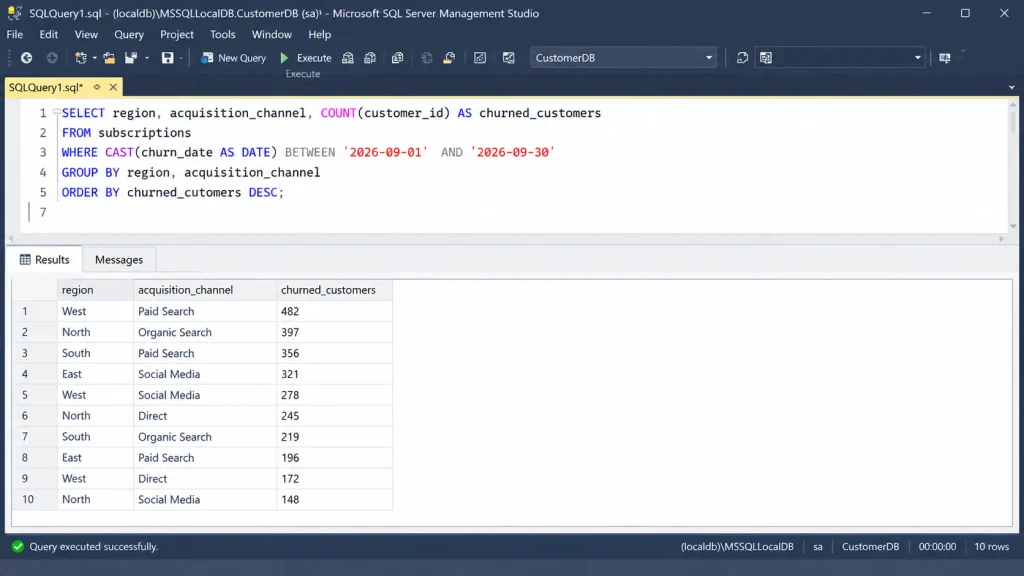
The agentic AI path: You give it the same goal. It writes a near-identical query, hits the same text-to-date error, catches it, recasts the column, and reruns the query without asking you. It then layers in a second query comparing churned customers’ average order value against active customers in the same cohort, before generating the chart on its own.
Insight: In both cases, churn is concentrated in one region and skews heavily toward customers acquired through a single paid channel, with an average order value roughly ₹1,400 lower than active customers in the same cohort.
Mistake to avoid: Treating the agent’s finished chart as the end of the analysis. A self-correcting pipeline can still misinterpret a business rule, so confirm the churn flag actually excludes customers on a paused plan before the number goes upward.
Recommendation: Flag the underperforming acquisition channel for a pricing or onboarding review before the next campaign spend is approved.
A Second Example: The Weekly Sales Report
The same contrast shows up in a far more routine task. Asked to prepare a weekly sales report, generative AI will write the aggregation query and a summary paragraph once you supply the latest export. An agentic setup, given the same recurring goal, can pull the latest numbers from the warehouse itself every Monday morning, flag any region that dropped more than 10 percent week-on-week, and send a formatted summary without anyone opening a notebook.
Generative AI vs Agentic AI: How They Work Together
In practice, the two rarely compete; they stack. Generative AI focuses on reasoning over language: writing a query, explaining a result, drafting a report in plain English. Agentic AI focuses on reasoning over a workflow: deciding what to do next, running it, and checking whether the outcome actually answers the original question.
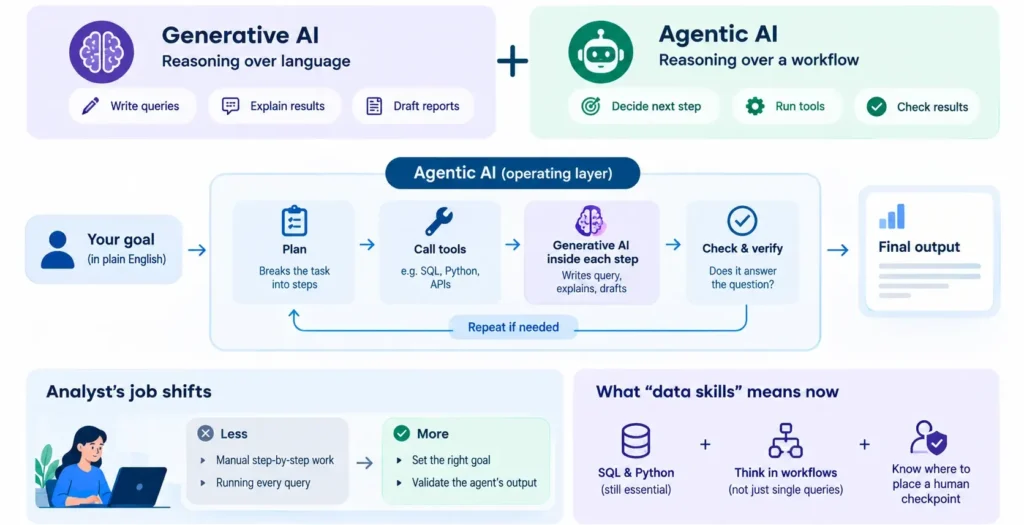
Most modern enterprise data stacks use agentic AI as the operating layer the part that plans, calls tools, and tracks state across a task while generative AI sits inside each step as the reasoning engine that actually writes the query or drafts the final summary. An analyst’s job shifts accordingly: less time spent manually running each step in sequence, and more time spent setting the right goal upfront and checking the agent’s output before it reaches a stakeholder.
For a junior analyst, this changes what “data skills” actually means. Knowing SQL and Python is still the foundation, since an agent’s output is only verifiable by someone who can read the query it wrote. What is new is the need to think in terms of a whole workflow rather than a single query, and to know where a human checkpoint needs to sit before a number gets presented upward.
Next Steps
Knowing the difference between generative and agentic AI is only useful once you can apply it to a real SQL table, a messy Excel export, or a live dashboard, which is exactly where we focus in the SBS Data Analytics program. Our students build the same query-debug-report loop covered in this guide, using real business datasets instead of toy examples, before they’re asked to work alongside an AI agent rather than compete with one.